Categoría: Photoshop
artículos sobre Adobe Photoshop.
Mejores Photobloggies | Best Photoblog
Un Photoblog como podéis imaginar no es otra cosa que un blog especializado en Fotografía, dentro de esta categoría hay muchas subcategorías. Este es un ejemplo.
Esta web premia a los mejores, esta vez hay un jurado, no son los internautas, hay muchas secciones, echa un vistazo algunos son muy buenos.
Winners have been announced for 2006. See you next year! You can also check out other year’s awards.
About the Photobloggies
The Photobloggies is an annual award ceremony celebrating photoblogging around the world. Through the Photobloggies, you can find some of the best photoblog sites on the internet. Organized by Brandon Stone, Jake Dobkin, and Rannie Turingan, it includes awards based on geographic region, photoblog subject matter, and «best of» categories.
Panel of Judges
This year we’ve invited editors from select photography magazines to make up our panel of judges. After the Open Nomination Phase has finished these editors will choose our final winners. Here they are in alphabetical order… Be sure to check all of them out!
AK47.tv, Bending Light, File Magazine, foto8, Gomma Magazine, Hamburger Eyes, JPG Magazine, Light Leaks, Making Room, Mooncruise, Photoblogs Magazine, Revol Magazine, U&I Mag
The Rules
A photoblog is a website whose primary content is photographs displayed in a log format. Many examples of photoblogs can be found at Photoblogs.org.
Nomination Phase
- Nominations are open to everyone.
- You may fill out the nomination form as many times as you like. Only your most recently validated form submission will count.
- Every form submission must be validated via email in order to count.
- URLs are required for nomination.
- You may nominate up to three URLs per category.
- You may nominate your own site.
- There is no limit to the number of categories in which a site may be nominated.
- In cases where voting fraud is observed fraudulent votes will be discarded.
- The organizers photoblogs are not elligible for nomination.
- Nominations should be for websites that were online during 2005.
Judging Phase
- As determined by the Nomination Phase, ten final nominees will be selected in the Photoblog of the Year and Photo of the Year categories. Five final nominees will be selected for each of the remaining categories.
- Winners will be determined from the lists of final nominees by our panel of judges.
Timeline
The Photobloggies includes a round of open nomination, followed by a closed judging process. Winners will be announced live at the North American Photobloggers Meetup in Toronto. Important dates:
- Evening of Mon, April 24th, 2006: Site launch. Categories announced. Nomination Phase opens.
- Mon, May 8th at Midnight (EST): Nomination Phase closes.
- Evening of Mon, May 8th: Final nominees announced. Judges will be contacted with their final nominees lists. Judging Phase begins.
- Mon, May 15th at Midnight (EST): Judging Phase ends.
- Weekend of May 20th: Winners announced live in Toronto.
- Evening of Mon, May 22nd: Winners will be announced on this website.
Steal These Graphics
Feel free to use these graphics on your blogs and websites!
There are even more graphics over here…
Thanks
The organizers would like to thank our amazing panel of judges for contributing their editorial talents this year! We would also like to thank Desi Aragon for creating the Photobloggies logos.
Best American Photoblog
Best photoblog from the United States and U.S. territories (Puerto Rico, the Virgin Islands, Guam, etc.)
Winner
Runners-Up (in random order)
- http://www.travisruse.com/
- http://www.joesnyc.streetnine.com/
- http://www.durhamtownship.com/
- http://orbit1.com/
Best Canadian Photoblog
Best photoblog from Canada.
Runners-Up (in random order)
Best Latin American Photoblog
Best photoblog from the countries of Central and South America.
Runners-Up (in random order)
- http://danielgn.my-expressions.com/gabriela.html
- http://quieto.motocine.com/
- http://fotosgrises.blogspot.com/
- http://ciudadanonima.visualblogging.com/
Best Western European Photoblog
Best photoblog from Western Europe. Including the British Isles, Scandinavia, and Iceland.
Runners-Up (in random order)
Best Australian / New Zealand Photoblog
Best photoblog from the countries of Australia and New Zealand.
Winner
Runners-Up (in random order)
- http://www.boudist.com/
- http://www.sh1ft.org/shutterbug/
- http://www.neverhappen.com/
- http://blog.jinkyart.com.au/
Best Eastern European / Russian Photoblog
Best photoblog from Eastern Europe, Russia, and surrounding countries.
Winner
http://dgoutnik.net/
Runners-Up (in random order)
- http://kepesvagyok.my-expressions.com/
- http://shotzz.instalacja.pl/
- http://www.melancolie.fotolog.pl/
- http://blog.shadowtones.net/
Best Japanese Photoblog
Best photoblog from Japan.
Runners-Up (in random order)
Best Southeast Asian Photoblog
Best photoblog from the countries of South East Asia, China, India. (Including South Korea, Hong Kong, Taiwan, Sri Lanka, and islands of the Indian Ocean.)
Runners-Up (in random order)
Best African / Middle Eastern Photoblog
Best photoblog from the continent of Africa and the countries of the Middle East.
Winner
Runners-Up (in random order)
- http://www.kosoof.com/
- http://alikhaligh.com/photoblog/
- http://www.vx400.com/
- http://www.takhtesiah.com/blog/
Best Writing
This category recognizes the best writing and commentary of a photoblog — including criticism, free verse, fiction, etc.
Runners-Up (in random order)
- http://www.notraces.com/
- http://www.jengray.com/
- http://chromogenic.net/verba/
- http://www.cloudybright.com/photoblog.php
Best Black and White Photography
Recognizing the best photoblog featuring mainly black and white images — digital or scanned from film.
Winner
http://dgoutnik.net/
Runners-Up (in random order)
- http://outafocus.my-expressions.com/
- http://www.shannonrichardson.com/electrolite.html
- http://photoblog.jbuhler.com/
- http://www.leveckis.net/journal/
Best Animal Photography
This one is for all you dog and cat photobloggers — recognizing sites that often feature photography of pets.
Winner
Runners-Up (in random order)
Best Abstract Photography
Recognizes photoblogs mainly featuring abstractions in all forms — color and shape patterns, close-ups, odd reflections, etc.
Runners-Up (in random order)
Best Studio Photography
For studio technical pros. Recognizes the best photoblog mainly featuring studio work, including portraits, macro, etc.
Winner
Runners-Up (in random order)
- http://www.istoica.com/everyday/
- http://www.round-here.net/blog/
- http://milo.blogs.com/
- http://blog.ayola.com/
Best Photojournalism
Best photoblog mainly featuring visual reportage of news subjects. War, crime, bake-offs, whateva!
Runners-Up (in random order)
- http://markhancock.blogspot.com/
- http://www.journalofaphotographer.com/
- http://www.fourteenplacestoeat.com/
- http://blog.blinking8s.com/
Best Landscape Photography
Best photoblog mainly featuring landscape photography — urban or au natural.
Winner
http://zenith9.my-expressions.com/
Runners-Up (in random order)
Best Toy Camera Photography
Who are you calling a toy? Recognizes the best photoblog mainly shot with a Lomo, Holga, or other camera costing less than $50.
Winner
http://thatwasmyfoot.my-expressions.com/
Runners-Up (in random order)
- http://outafocus.my-expressions.com/
- http://www.luminescent.org/
- http://gotreadgo.blogtog.com/
- http://www.outofcontxt.com/
Best Street Photography
Best photoblog that mainly featured street scenes, with or without people in them.
Runners-Up (in random order)
Best Portrait Photography
Best photoblog that mainly featured portraits of people or other things with faces.
Winner
Runners-Up (in random order)
- http://blog.jinkyart.com.au/
- http://orbit1.com/dailyphotos.aspx
- http://www.istoica.com/everyday/
- http://www.slower.net/
Best Kept Secret
The best photoblog that not many people know about! Hopefully we can help change that.
Runners-Up (in random order)
- http://www.eightyfour.net/
- http://www.tmcdaily.com/
- http://www.shutterjunkie.co.uk/
- http://liminality.tristanroy.com/
Best Photoblog Design
Looks count: recognizes outstanding design, layout, and navigation.
Winner
http://www.intransient.com/photojournal/
Runners-Up (in random order)
Best Under 18 Photoblog
Think of the children! Recognizes the best photoblog shot by someone who was younger than 18 during 2005.
Runners-Up (in random order)
- http://colourblind.ca/
- http://www.ferociouscheese.com/
- http://www.dyroxy.com/
- http://www.headphoneland.com/
Best New Photoblog
For the newbies: Recognizes the best photoblog started during 2005 (Jan 1-Dec 31.)
Runners-Up (in random order)
- http://www.tmcdaily.com/
- http://www.shutterjunkie.co.uk/
- http://www.jonathangreenwald.com/
- http://www.istoica.com/everyday/
Photo of the Year
The single photoblog post that stands out among all the rest. Please use the permalink URL for the post and make sure the photo was posted in 2005! You can find several older photoblog posts via the Photoblogs.org Blog and also del.icio.us.
Runners-Up (in random order)
http://joephotos.blogspot.com/2005/08/old-monk-in-monestary-in-luang-prabang.html
http://outafocus.my-expressions.com/archives/1457_1179403579/110181
http://www.abeatexperience.com/experience/2005_08_22.php
http://www.travisruse.com/archives/2005/04/7th_ave_f_stati.php
http://notraces.com/2005/01/time_stand_still.phphttp://wvs.topleftpixel.com/archives/photos_landscape/050218_1042.shtml
http://www.beyondmonochrome.com/
archives/2005/12/joe_in_the_governors_waiting_area.php
http://www.cobwebstudios.com/cws_photos53.htm
http://www.jocund.org/archives/000235.phpPhotoblog of the Year
The best of the best — the big kahuna. The photoblog that was consistently most excellent throughout 2005.
Runners-Up (in random order)
- http://www.durhamtownship.com/
- http://www.orbit1.com/
- http://www.istoica.com/everyday/
- http://www.leveckis.net/journal/
- http://www.abeatexperience.com/experience/
- http://thenarrative.net/
- http://www.chromasia.com/iblog/
- http://mute.rigent.com/
- http://www.notraces.com/
Winners have been announced for 2006. See you next year! You can also check out other year’s awards.
The 2006 Photobloggies
Mejores fotos de Flickr | Best Photos in Flickr
La enorme base da datos fotográfica Flickr.com es fuente de muchos sitios, blogs, páginas de widgets.
Os propongo esta que no es más que un blog con una selección personal de las mejores fotos que podemos encontrar.


¿El tamaño importa?
El tamaño ha importado por ahora a más de 50 usuarios que al final han dejado sus ojos en este interesante artículo y sus cincuenta y tanto comentarios.
La utopía de una red 100% accesible cuando sus clientes sólo ven $$$ sólo tendrá mi fe cuando la tecnología y no los diseñadores se esfuercen más. Son los navegadores los que deberían personalizar la experiencia del usuario, este hace su configuración y decide cómo navegar, esa es la experiencia que busca.
Si sirve de algo, depende del uso gráfico que el cliente quiera se podrá trabajar en em o en %. De todas formas coincido en que los usuarios podrán luego aumentar (Ctrl+) o disminuir(Ctrl-) a gusto y necesidad. Y en mi caso sí utilizo Cleartype. (que conste por si hay encuesta)
Estándar 100% fácil de leer
Tengo ordenadores desde los tiempos de Maricastaña. Paso al día, unas 10 o 15 horas «“el que más»“ mirando la pantalla de mi Mac. Leer es una de las primeras actividades que realizo en el ordenador. Realmente, desde hace 2 años, con algunas dificultades.Un día salía del trabajo, bastante cansado por cierto y, mientras caminaba a casa, me daba cuenta que no podía leer ningún cartel de forma clara como pensaba. No me lo podía creer. Nunca tuve problemas de visión, ni nada parecido. Al principio no le había prestado atención al tema, pero al cabo de dos semanas, me ocurría lo mismo. Pensaba que era el cansancio, pero no, era la vista. Fui al oculista, me hicieron unos chequeos y en efecto, tenía problemas de visión. La oculista me dijo que no eran graves. No uso aumento sino, unas lentes correctoras con un leve aumento. Me dijo que, por como estaba el tema, o leía docenas libros al día o me pasaba mucho tiempo frente al ordenador. En efecto, era lo segundo. Me dijo que un montón de gente se jode la vista leyendo en el ordenador, sobre todo por los factores lumínicos de los monitores, la cantidad de horas frente a la pantalla y la aproximación que tienen con ésta.
Al darme los anteojos, me dijo que tratara de subir el tamaño del texto a leer siempre que pudiera, así forzaba la vista lo menos posible. A partir de ese momento, comencé a subir progresivamente el tamaño de letra de mi sitio, y el de otros mediante el navegador. No muy tarde, comencé a ver las ventajas de leer con letra, un poquito más grande de lo habitual (11px a 12px). Pocos sitios pasan de esta medida y, realmente se agradece cuando usan tipografías grandes.
¿Y por qué estoy escribiendo esto? Porque hoy estuve leyendo una conversación entre blogs sobre el tema: el uso de tipografías grandes en los sitios web, particularmente, los blogs.
Hoy mi sitio «“y no porque se inició esta charla»“ cuenta con un tamaño de tipografía bastante grande para lo habitual. Yo no me muevo en valores con píxeles, utilizo
empara casi todo lo relacionado con tipografías. Hay dos tipos de unidades de medida: relativas y absolutas. Las unidades de medidas relativas especifican una medida en relación a otra propiedad de medida. La medidaemes relativa, lo cual dependerá de otro valor base, ya sea propia del navegador, o bien, especificada por el usuario o el autor sobre el elemento base<body>. El cuerpo de letra en este weblog, si no me equivoco es de.9em, que equivaldría a unos15pxpara el resto de mortales que leen el blog si utilizan Firefox o Internet Explorer en Windows «“con la configuración base»“ y dependiendo de la configuración que dispongan. Lo común, para algunos diarios, revistas y blogs es, usar este tamaño de letra para los títulos y no para los textos. Los textos, en letra pequeña. Nunca acepté que las letras pequeñas son mejores que las grandes. Quizás, tanto otros como yo, ponemos más sobre la balanza lo estético que lo útil. Es una debilidad que traemos los de carne y hueso. Pero eso se acabó hace un tiempo, y amigos, lamento decirles que no es moda. Esto viene de hace mucho. La letra grande vino y se quedó para eso: para facilitar la docena de horas frente a la pantalla del maldito ordenador.Están los que se enojan con esto. Están los que adoran. El primer día que subí la letra del sitio más de 11 píxeles, la gente se quejó. Digo la gente por no decir cinco personas de las mil que leían a diario. A los 8 meses cambié de nuevo los tamaños. Fue a raíz de aumentar mi sitio con los controles del navegador. Simplemente me dio mucho gusto verlo así, con esos tamaños y que, cada vez me costaba menos leer comentarios de la gente. Recibo al día más de 100 comentarios y se agradece tener este tamaño para poder leer la opinión de la gente.
Jonathan escribió un artículo sobre la lectura fácil que tiene muchos puntos interesantes. Bien como lo explica, letras grandes; lectura sin esfuerzos. Pero el problema que yo veo en estas cosas es, que no siempre es aplicable esto en un diseño, menos en uno corporativo. No porque quede feo «“esto es trabajo del que lo diseñe»“ sino porque utilizar tipos grandes complica muchas cosas, entre ellas, los espacios disponibles y la posibilidad de determinados contenidos estar a la vista. Si siguiéramos el texto de Jonathan al pie de la letra, muchos sitios tendrían kilométricas páginas de contenidos. Algunas fotos darían la sensación de ser íconos más que fotografías. El balance se corrompería en muchos casos. Es por eso, y en mi opinión, meter tamaños grandes de forma desproporcionada no ayuda; tipografías grandes pero no en exageración. Zeldman condujo estudios hace años sobre esto, y dieron como resultados en la mayoría de los casos, tipografía de 13px era legible por más del 80% de los participantes sin dificultad. Cuando se reducía a la estética 11px, dependiendo la tipografía «“si era serif o sans»“ se reducía al 60%.
En mis pruebas, los resultados no variaron mucho. Ahora estoy implementando tamaños superiores a los 13px con muy buenos resultados. El contraste se aprecia con más relevancia, las formas de las tipografías destacan más y el rango de accesibilidad que estoy dando es muy superior por sobre la media.
Federico hace hincapié en el tema pero creo, en mi opinión, que se lee olvidó algo: usar tipografías grandes no es problema. El problema está en cómo los diseñadores utilizan estas tipografías. En los casos que vemos tipografías grandes y nos duele la vista, es porque no le han encontrado el balance que armoniza todo. Muchos saben de lo que hablo: los tamaños de los títulos, los espacios en blanco, los interlineados, etc.
Hoy en día, muchos medios on-line están adaptando estas medidas. Algunos van en el rango de los 11px/13px y otros, como por ejemplo, 20 Minutos, se encuentra en rangos mayores. El punto es: yo leo mejor gracias a estos detalles. No solo por el tamaño de las tipografías, sino por la excelente proporción que los diseñadores han utilizado.
Letras grandes, usuarios contentos y sanos, menos ciegos y más lectores.
Recursos de Diseño | Design resources
Una recopilación de sitios que hay que visitar:
Design Resources
A list of very resourceful web sites in the design community.
Design Portals
howdesign, scene360, netdiver, pixelsurgeon, kaliber10000, surfstation, design is kinky, gouw.nu, fwa, design interact, ultrashock, media inspiration, newstoday, css beauty, design meltdown, webcreme, cssremix.com
Design Books
adobe photoshop books, html books, interface design books, web design books, flash books, dreamweaver books, color usage books, typography books, photography books, ajax books
 , web design standards, css books
Stock Photography
istockphoto, dreamstime, photos.com
, corbis, thinkstock, picturequest, gettyimages, comstock, veerWeb Standards and CSS
alistapart.com, thinkvitamin.com, creativebehavior.com, treehousemagazine.com, webstandards.org, dezwozhere.com links, webstandardsgroup.org, andybudd.com, meyerweb.com, the web developer’s handbook, adaptivepath.com essays, csszengarden.com
Development Resources
thebestofwebhosting.com, htaccess-cheatsheet, dynamicdrive.com, webdesigntimes.com, css property index, understandingxml.com, css form creator, css rounded box generator, css browser compatibility chart, cssbasics.com, css layout gala
Design Magazines
Communication Arts
, Step Magazine, Create Magazine, Print Magazine, How Design Magazine, Dynamic Graphics Magazine, CMYK MagazineThe Best Designs – [TheBestDesigns.com] – Recognizing The Best of Web Design
Photoshop | Tutoriales | Trucos | Tips
Photoshop Tutorials
- Aging Photos
Tips & Tricks for making photos look old - All about Layer Mask
It is often used to prevent some part of the layer from being seen. - Create Your Own Planets
The «Polar Panorama Effect» is one of ways to process photos into unique pieces of art. Tutorial by Dirk Paessler - Creating grunge brushes
by Veerle Pieters - Creating patterns in Photoshop CS2
«Have you ever wondered how you create a seamless pattern in Photoshop? It»™s easy and it»™s fun. Let me show you how.» by Veerle - Doug»™s technique for creating curtains
Tutorial on generating fabric drapes (like curtains) in Photoshop (7, but should work in earlier versions too). Based on Doug»™s «Fake satin» technique. - Glassy Orbs in Photoshop Tutorial
This Tutorial has come about due to a few requests. This starts with a fairly simple object, and finally ends up with the orb Design. Take it step by step. - A Gradient Tutorial
Written by Mike Rundle - Graphic Reporter
Digital Beauty Shop – Changing the color of hair - Hair and Fur
Tutorial: Realistic Hair And Fur - Magnifying Glass Tutorial
This is a nice easy method to create the illusion of a magnifying glass which you can lay over any background you like. - Melissa Clifton – Photoshop Tutorials, Animation, 2D, 3D and Illustration Galleries
Pop Art Inspired by Lichtenstein,Digital Candy, Vector Art with Photoshop, Turn Photos of People into Line Art, Create Basic Line Art from Your Photos - Mizuno»™s Super Airbrush PP Tutorial!
The name says it all. - Painting Grass
Tutorial on creating photo-realistic grass in Photoshop – by John Shannon - Partial Color
Black and white photos with just a touch of color - Perfect Pixel Patterns
Create perfect pixel patterns in Adobe Photoshop every time! - PHOTOSHOP Matte Painting
Tutorial by Sebastien Gaucher - PHOTOSHOP Matte Painting : winter
Tutorial by Sebastien Gaucher - Professional changing of Eyecolor
It might seem complicated but is in fact really easy. There are various methods of changing the eye colorColorizing Grayscale Image, - Ray of Light
Use Photoshop to create and add a dramatic ray of light to your photos - Replacing a Background
This is a tutorial in removing a background from a picture and replacing it with another. – Tutorial by Bud Guinn - Selective Color
How to create a grayscale image with just a touch of color - Softening Freckles
The magic of selective blurring - Super Silhouettes
Channel your way to a perfect silhouette - The Basics of Retouching People, Part 1
The secret to losing 5 pounds»“digitally! - The Basics of Retouching People, Part 2
Banishing bags «˜n blemishes - The Basics of Retouching People, Part 3
How to whiten teeth - Vector Art with Photoshop
Learn how to use Photoshop to create OUTSTANDING vector art
Libraries of Photoshop Tutorials
- Adobe Illustrator & Photoshop Tutorials & Lessons
Computer Graphics Illustration Tutorials, Tips, & Tricks for Students by Kevin Hulsey - Adobe Photoshop Tutorials
Tutorials are categorised to: Photo Effects and Retouch, Web Graphics and Layouts, Drawing, Animation, Text Effects - AdobeTutorialz
Tutorials are categorised to: Photoshop Basics, Special Effects, Textures & Patterns, Designing, Buttons - Computer Arts – 2D & Photoshop
Tutorials are categorised to: Latest tutorials, Photoshop & 2d, Web & new media, 3D & animation - FreshTuts
Fresh Tutorials For Photoshop. Find, search, submit and view fresh tutorials. - GFX-Tutor
More than thousand Photoshop Tutorials - Graphic Design tips, tricks, tutorials using Photoshop
A unique resource site for Photoshop® users with great tips, tricks, tutorials and graphics. Tutorials are categorised.. - Good-Tutorials.com – Adobe Photoshop Tutorials
Good-Tutorials.com lists 11,802 Adobe Photoshop tutorials - Heron Productions
Tutorials – TigerPig!, Comic Book Effect, The Warhol Effect.. - Lunacore Photoshop Tutorials
Beautify a Face, Smooth Skin , Glass Ball, Water Drops, Realistic Clouds - PhotoshopCAFE
Free photoshop tutorials from PhotoshopCAFE - Photoshop Facelift
Tutorials for photoshopping people - photoshopit
HALF BLOG HALF TUTORIAL site and some freebies along the way. - Photoshop Lab
Tutorials - PhotoshopSupport.com
Free Photoshop Tutorials & Photoshop Tips - PhotoShopTutorials.de
Texteffekte, Interfaces, Fotoeffekte, Spezialeffekte, Buttons - Pixel Groovy
Pixel Groovy is the social bookmarking way of finding the best tutorials and lessons - Planet Photoshop
Tutorials are categorised to: Effects, Photography, Text, Web - PS Workshop
Find That Exact Photoshop Tutorial, Photoshop Tips, Tools, Plug-ins and Blog, Adobe Photoshop - t-Tutorials.com
Tutorials are categorised to: Effects, Text Effects, Photo Effects, Photo Retouch, Buttons, Textures, Drawings, Basics, GIF Animation, Website Design. - Tutorialing
Tutorials Multilanguage Search Engine – Animation, Buttons and Interfaces Drawing, Icon Creation, Special Effects - Worth1000.com
Photoshop Tutorials - A Beginner’s Guide to Photoshop (vía Dan)
- An Introduction to Photoshop
- What is Photoshop?
- Familiarizing Yourself With the Photoshop Interface
- Getting Started With Photoshop
- Photoshop Lessons
- Helpful Photoshop Tutorials
- How to Use Keyboard Shortcuts in Photoshop
- Editing a Batch of Images in Photoshop
- Creating Actions in Photoshop
- Photoshop Visual Design Tutorial
- Aging Photos
Fotos dietéticas | Cámara HP que adelgaza | Slimming photos with HP digital cameras
Está claro que a Photoshop no le gana nadie retocando y mejorando caras y cuerpos de gente más o menos necesitado pero siempre preocupada, particularmente no entiendo la mentira, es decir, la foto quedará pero qué dirás que te la hiciste el año pasado…
Si quieres aprender a hacerlo con Photoshop, haz este curso gratuito de Photoshop CS.
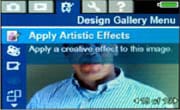
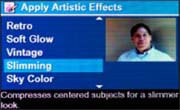
They say cameras add ten pounds, but HP digital cameras can help reverse that effect. The slimming feature, available on select HP digital camera models, is a subtle effect that can instantly trim off pounds from the subjects in your photos!
Slimming photos is easy to do


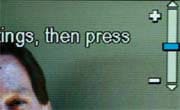
To use the slimming feature, first take a photo. Then, while in playback mode, use the arrows to select an image and press OK. Highlight the Design Gallery menu tab using the arrows. Use arrows to highlight Apply Artistic Effects and press OK. Then highlight Slimming and press OK. Adjust the slimming level using the arrows. Then press OK, and you’re finished. Slimming photos with HP digital cameras – HP Digital Photography Center
Crea una Carpeta con Photoshop
En esta ocasión les dejo un vídeo tutorial, donde explicaré cómo realizar el ejemplo que vemos en la parte superior. En caso que se compliquen un poco con la explicación. Les dejo un archivo rar, en descarga directa. En este archivo se encuentran 7 imágenes de un tamaño de 275 x 275. Incluye el ejemplo de la carpeta, para ser modificado en Photoshop. El efecto de las imágenes que también podemos modificar desde Photoshop. Y por último la imagen del trabajo final. www.tutoriales.de
Crea una Carpeta con Photoshop. « Goomaster
En www.campus.ceslava.com tenéis a vuestra disposición un curso de Photoshop CS completamente gratuito.


 Tengo ordenadores desde los tiempos de Maricastaña. Paso al día, unas 10 o 15 horas «“el que más»“ mirando la pantalla de mi Mac. Leer es una de las primeras actividades que realizo en el ordenador. Realmente, desde hace 2 años, con algunas dificultades.
 ,
,